
How to use The Texting Feature
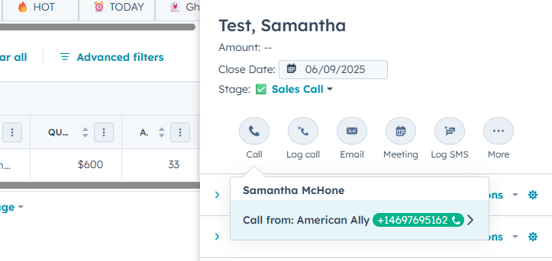
1. Click-To-Call in Hubspot, as you would normally to place a call
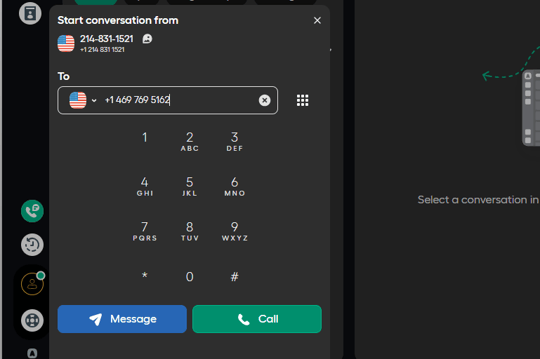
2. In Aircall Select "Message"
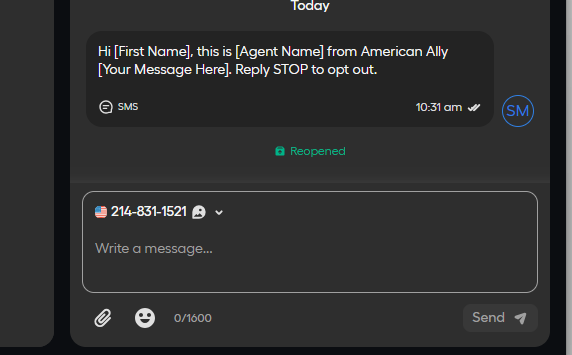
3. Your Message Will Log In Aircall:
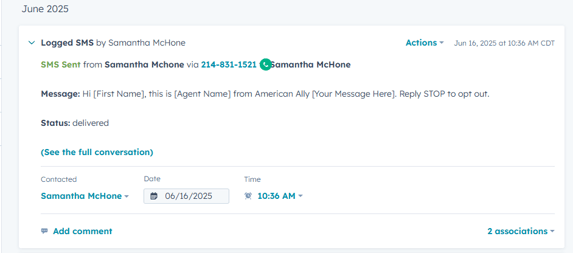
3. Your Message Will Be Logged In The Activity History In Hubspot:
SMS Compliance Requirements
🔐 1. Always Confirm Opt-In First
Before texting a prospect:
✅ Confirm they checked the SMS opt-in box in the "Source" section (sms consent: on)
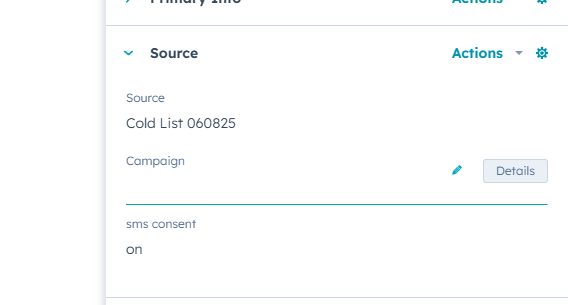
✅ If consent was not given at form submission you can still get consent over the phone or via email, by asking: "Can I send you occasional text messages with offers from American Ally? These may be sent using automated systems. Msg & data rates may apply. Reply STOP to cancel, HELP for help. It’s optional.”
❌ Do not text any prospect who didn’t opt in — even if they provided a phone number.
📝 2. Use an Approved First Message Format
Your first text must include:
-
Your company name (American Ally)
-
Why you’re texting
-
Instructions to opt out
✅ Example First Message:
Hi [First Name], this is [Agent Name] from American Ally [Your Message Here]. Reply STOP to opt out.
🔁 3. Always Honor STOP/HELP Commands
If a contact replies STOP, they will be automatically unsubscribed and their "sms consent" field will show "stop". Don't worry - AirCall won't let you text them by accident.
If they reply HELP, they will receive the following automated message:You can reach our support team at or visit americanally.com for help.
🕐 4. Respect Time of Day
Only text prospects between 8:00 AM and 9:00 PM in their local time zone. Outside those hours, wait until the next day.
🧠 5. Don’t Mislead or Pressure
-
Be transparent: say who you are, what you're offering, and why.
-
Avoid deceptive language like “free coverage” unless truly free and with no obligation.
-
Never imply texting is required for quotes or service.
🚫 6. Never Use Personal Phones or Unapproved Tools
-
Always send texts via Aircall our approved SMS platform.
-
Do not use personal mobile numbers or WhatsApp/Signal/etc.
❌ 7. Handling Rude or Aggressive Prospects
Your safety, time, and professionalism matter. We do not expect you to win over toxic people — especially via text, which is billed per message. If someone is being inappropriate, disengage immediately. Here’s how:
-
Do NOT engage or argue — never try to “fix” a rude prospect. It’s not worth the time or cost.
-
Use a one-time, professional close-out message (if needed):
“Understood. We’ll go ahead and remove you from our list. Take care.” -
Block the number immediately after sending a close-out message:
Send the phone number you need to block to over chat or email to Samantha McHone, samantha@americanally.com -
Move the Deal to "Closed Lost - DNC" in HubSpot.
-
If the message is threatening or alarming, screenshot it and report it to your team lead.
-
Trust your gut — if something feels off, it is. You’re never expected to pursue leads that make you feel unsafe or disrespected.
🧠 Some people are just not our people—and that’s okay. We’re here to serve real families who want help.